
The API
The PushAPI manages all the required data needed to send a notification. In this page it will be explained the internal architecture of the API, the database, how it works and some other useful information.
Inside the API
The API is implemented in order to be fast without timeouts waiting to send the expected notifications. As it is represented in Figure 1, there are various elements handled internally. It will be explained from left to right the various parts of this API:
- As all REST APIs, it handles various HTTP requests/responses in order to manage different functionalities. It handles CRUD and uses GET/POST/PUT/DELETE methods.
- The API is designed in order to maintain various aspects needed to send a notification. It is directly connected with some databases.
- The DB is used to store the required user information needed to send the notifications to its destinations (user information, notification themes, ...). It also manages the user preferences and multicast group subscriptions.
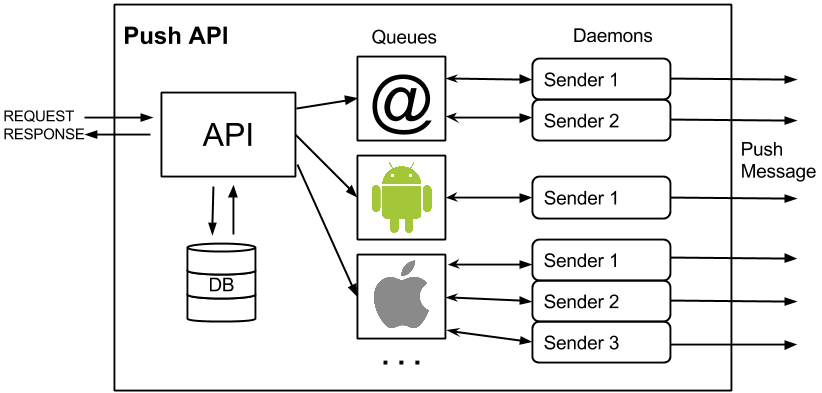
Figure 1. Internal Structure
- The queues are handled by a Redis database. Each queue has a main destination target (email, android, ...) so data of each queue its different and it should not be mixed. It is filled with specific data that is used to send the notification to the user (target address, message, date, ...).
- Finally, there are some workers/daemons specialized on reading one type of queue, generate the notification and send it to the specific server (mail server, google, ...). These workers should be running all the time or the notifications will not be send. To see more information about the workers follow this link.
The database
PushAPI manages an internal database in order to keep up to date all the events related with the notifications.
In order to use the Push API, it is interesting to know all the information that it manages and the information that the agent should know or store in its own database.
In Figure 2 there is a relational database schema.
.png "BBDD Final (2).png")
Figure 2. DB tables
- Apps, there is stored the apps that are available to use the PushAPI (remember, without an app created, you can't manage the API).
- Users, all the users that will use the service are stored in here, it is only stored its receive identifications (email, android device id, ...).
Each user you store in the Push API DB, you should store its unique id because it is the main user identification through Push API requests.
- Themes, each kind of notification is established as a theme. Each theme contains the name of the notification (i.e. user_follow) and the range of the notification (unicast, multicast, broadcast).
- Preferences, foreach theme, an user can set its preferences in order to choose how he wants to receive the notification. If it has not set a notification, default value is to receive it via all enabled devices.
- Channels, the groups that users can follow to receive specific notifications are called channels.
- Subscriptions, if users are interested to follow notifications that are happening in a specific group, they should subscribe to that channel, the resulting subscription it is stored in this table. By default anyone is subscribed into any group.
- Logs, it is stored a log of the main information that is send in the notification.
- Subjects, themes names could not be good names for sending as mail subjects and this table contains a customizable translation (example: user_comment => User has commented on your profile). The subject can be customized once on the send request.
- Trackings, it is used to store some information about the user that opens a mail and it is used to track the opened mails per theme and day.
There are also a Redis database used as queue where it is stored the information requried to generate a notification and send it to its destination. It is created one list for each possible destination (Email, Android, ...).
How it works?
Once you know the internal parts of the API and the data that it is managed, you are ready to know how it works.
The API manages all the necessary methods to send a notification. Most of the work is done by the Push API but the agent should act as the manager.
Basic CRUD Actions
In order to manage all the basic actions needed to finally send a notification to target/s there are some CRUD actions prepared for this purpose. You can see the all of them in API ROUTES section.
Basic data to send the first notification
The basic data required to send a notification is to have an user (with email) registered into the Users table and to have a theme (set as unicast or broadcast) created into the Themes table. Once it is set, you can do a /send request with the message, theme name (and user identification if theme is set as unicast) and run the Email worker.
Unicast
Sends messages directly to the target user.
Multicast
Sends messages to all users subscribed to a target channel.
Broadcast
Sends messages to all users that are already stored at the PushAPI DB.
Updated less than a minute ago